How to control group visibility based on loading states in Bubble
In this tutorial, we want to show a "Loading..." message while a Repeating Group or Group with a data source is fetching its data and hide it once the data is ready.
Setup
- Add a Repeating Group or a Group that has a data source which might take time to load (e.g., Do a search for...). Name this element Group Product List (or whatever data it displays).
- Add a Text element (or a Group containing a spinner image) somewhere on the page, ideally where the data will appear. Set its text to "Loading...". Name this element Text Loading Message.
- In the Text Loading Message's property editor, under Layout, keep "This element is visible on page load" checked.
- In the Group Product List's property editor, under Layout, you might want to uncheck "This element is visible on page load" so it doesn't flash empty data, although sometimes leaving it checked is fine if its content relies purely on the data source loading. Let's uncheck it for this example to ensure the loading message is primary.
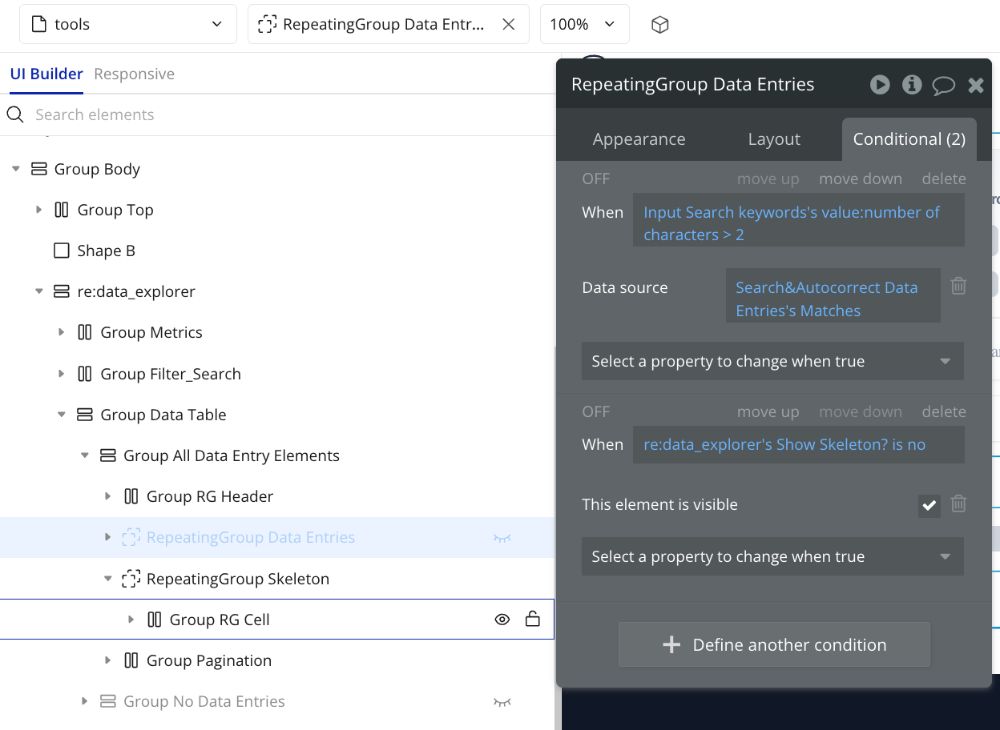
Add the Conditional Logic
For the Text Loading Message (hide when the data group is not loading):
-
Select Text Loading Message.
-
Go to the Conditional tab.
-
Click Define another condition.
-
Click where it says "Click here to define a condition".
-
Select your data group: Group Product List.
-
Add the operator: Select is loading.
-
Set the value to no.
- Condition: Group Product List is loading is "no"
-
Click where it says "Click here to define another property."
-
Select This element is visible.
-
Set the value to no.
- Rule: When Group Product List is loading is "no" Then This element is visible is "no"
For the Group Product List (show when it's not loading - i.e., loading is complete):
-
Select Group Product List.
-
Go to the Conditional tab.
-
Click Define another condition.
-
Click where it says "Click here to define a condition".
-
Select Group Product List.
-
Select the operator: is loading.
-
Set the value to no.
- Condition: Group Product List is loading is "no"
-
Click where it says "Click here to define another property."
-
Select This element is visible.
-
Set the value to yes.
- Rule: When Group Product List is loading is "no" Then This element is visible is "yes"
Testing:
- Preview your page. The "Loading..." message should appear immediately.
- Bubble will start fetching the data for Group Product List.
- While the data is loading, the "Loading..." message remains visible, and Group Product List is hidden.
- Once the data fetching is complete (Group Product List is loading becomes no), the conditions will trigger: the "Loading..." message hides, and Group Product List becomes visible, displaying the loaded data.
ABOUT ME
Juliet Edjere is an AI Systems & Workflow Strategist. Lawyer by training, systems thinker by trade. Combining a legal background with low-code and data architecture expertise, she helps organisations design scalable data architectures, build secure, automated workflows and AI-native operations.
💡 Need help transitioning from fragmented data to secure, scalable systems?
- Work with Juliet: Book a 1:1 Strategy Session
- Build real-world experience: Explore simulated scenarios at JEA Labs
Website built with Carrd
Other Posts