Design a Legal Request Hub: Intake to Structured Legal Operations
How Microsoft 365, Power Automate and Power BI can work together to improve legal request management, visibility and operational reporting.
Introduction
Legal teams do more than review contracts, interpret legislation and provide legal advice.
They also manage incoming requests, prioritise competing deadlines, coordinate with different departments, maintain records, obtain approvals, produce documents and report on their workload.
In many organisations, these activities can be spread across emails, spreadsheets, shared folders and disconnected systems.
A request might arrive by email. Further information might be provided through Teams. The supporting documents could be stored elsewhere. Updates may be recorded in a spreadsheet, while management reporting requires someone to manually collect and reconcile the information.
Each individual step might seem manageable. The difficulty comes from having to connect them.
What happens when a request is missed? How does the team know which matters are urgent? Can the Head of Legal Operations see how much work is coming in, where it is coming from and how long requests take to complete?
These are not simply administrative questions. They are workflow, data management and operational visibility problems.
This article explores a proposed solution: a Legal Request Hub that connects request intake, matter tracking, workflow automation and reporting using Microsoft 365.
The objective is straightforward:
Create a more structured way for an in-house legal team to receive, manage, track and report on legal work.
TLDR; Implementation roadmap
I would approach implementation in stages.
The proposed workflow
The proposed workflow has five stages:
- Request submission.
- Validation and triage.
- Matter registration and allocation.
- Legal review and status management.
- Reporting and operational oversight.
Each stage should have a defined input, action, output and owner.
The purpose is not to automate every decision. It is to make routine work more consistent while preserving human judgement where legal assessment is required.
Phase 1: Process discovery
- Understand how requests currently arrive.
- Identify the people involved.
- Map the existing workflow.
- Identify bottlenecks and control points.
- Agree the initial scope.
Phase 2: Data and intake design
- Define the matter categories.
- Design the intake form.
- Create the SharePoint matter register.
- Define required fields and status values.
- Establish ownership and access requirements.
Phase 3: Workflow automation
- Build the request registration flow.
- Add notifications.
- Introduce approval handling where required.
- Add error handling.
- Test common and exceptional scenarios.
Phase 4: Reporting
- Connect Power BI to the matter register.
- Define the reporting measures.
- Build the operational dashboard.
- Validate the results against the source records.
Phase 5: Testing and adoption
- Test with fictional scenarios.
- Check permissions and access.
- Validate workflow outcomes.
- Document the process.
- Gather feedback from intended users.
- Refine the solution before wider deployment.
1. Understanding the problem before choosing the technology
A common mistake in workflow automation is starting with the tool.
Someone identifies a repetitive task, opens Power Automate and starts building a flow.
But automation should follow process understanding, not replace it.
Before designing the solution, I would first map the existing process and identify the points where information is lost, duplicated or delayed.
For an in-house legal team, the initial problems might include:
- Legal requests arriving through multiple channels.
- Incomplete submissions requiring repeated follow-up.
- No consistent method for classifying or prioritising work.
- Limited visibility of who owns each request.
- Difficulty tracking deadlines and outstanding approvals.
- Manual updates across multiple records.
- Limited reporting on workload, turnaround times and external legal spend.
These problems are connected.
For example, inconsistent intake creates incomplete records. Incomplete records make triage harder. Poor triage affects allocation. Inconsistent status updates then make reporting unreliable.
The solution therefore needs to address the process as a whole.
This is the part of legal technology that interests me most: understanding how people work, identifying where processes break down and translating those problems into practical systems.
The technology is important, but the design begins with the people and the process.
A good legal operations solution should not make the legal team work around another complicated system. It should make the existing work easier to manage, understand and improve.
2. Solution architecture
The proposed solution uses four Microsoft components.
| Component | Responsibility |
|---|---|
| Microsoft Forms | Captures incoming legal requests |
| SharePoint Lists | Stores and manages matter records |
| Power Automate | Coordinates workflow actions and notifications |
| Power BI | Provides operational reporting and dashboards |
The components have distinct responsibilities.
Forms provides the entry point. SharePoint provides the structured data layer. Power Automate handles process orchestration. Power BI turns the captured data into operational insight.
How the components connect
Step 1: Microsoft Forms
An employee submits a request through a standardised form.
Step 2: SharePoint Lists
The submission is converted into a structured matter record.
Step 3: Power Automate
The workflow checks required information, assigns an initial status and sends relevant notifications.
Step 4: Legal team review
A designated member of the legal team reviews the request, confirms its priority and manages its progress.
Step 5: Power BI
The matter register supplies data for reporting on demand, workload, status, turnaround and expenditure.
The architecture is deliberately modular. Each component has a clear purpose, which makes the solution easier to understand, maintain and extend.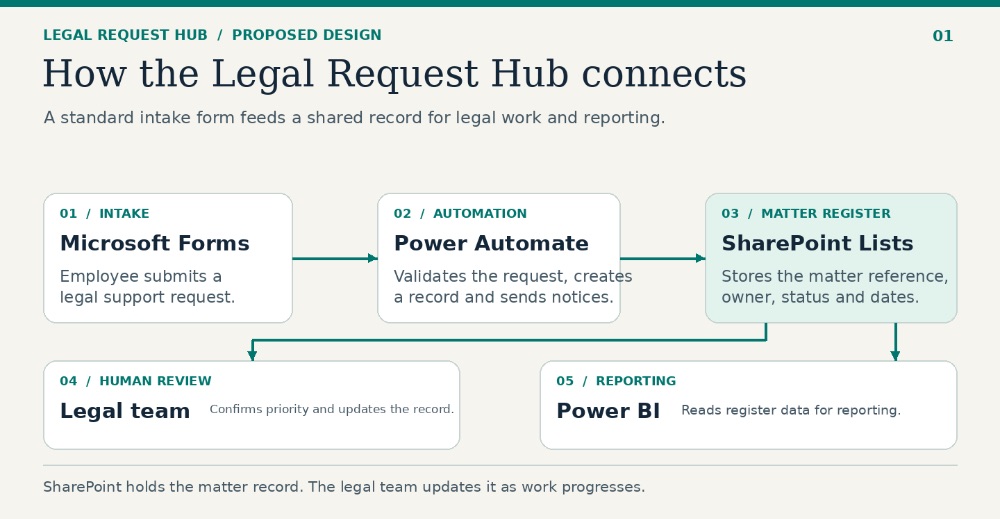
3. Designing the intake process
The quality of the information captured at the beginning determines how useful the rest of the workflow can be.
A form should collect enough information to support initial triage without becoming so complicated that employees avoid using it.
For this scenario, I would create an internal Legal Support Request form.
Proposed intake fields
| Field | Purpose |
|---|---|
| Requestor name | Identifies the person submitting the request |
| Requestor email | Supports communication and follow-up |
| Department | Identifies the business area |
| Matter type | Categorises the legal request |
| Counterparty | Identifies the other party, where relevant |
| Contract value | Provides an initial indication of financial exposure |
| Service description | Explains the nature of the request |
| Customer or resident impact | Helps identify potential operational impact |
| Personal data involved | Flags potential data protection considerations |
| Requested deadline | Captures the requested completion date |
| Reason for deadline | Provides context for prioritisation |
| Supporting documents | Allows relevant documents to be submitted |
Matter types could include:
- Contract review.
- Property.
- Employment.
- Litigation.
- Data protection.
- Regulatory.
- General legal advice.
The categories are illustrative. A real implementation would need to reflect the organisation's legal services and internal terminology.
Why structured intake matters
Consider two submissions.
The first says:
"Please review this contract urgently."
The second identifies the counterparty, contract value, service being provided, requested deadline, business impact and relevant supporting documents.
The second submission gives the legal team a much better starting point.
It does not eliminate the need for further questions, but it reduces avoidable ambiguity.
The aim is to make the information needed for initial assessment available as early as possible.
4. Building the matter register
Once a request has been submitted, the information needs to exist somewhere that the legal team can manage consistently.
For the proposed solution, SharePoint Lists provides the central matter register.
Each submission creates a new record with a unique matter reference.
Proposed matter data model
The register would contain the following groups of fields.
Identification
- Matter reference.
- Matter title.
- Date received.
- Requestor name.
- Requestor email.
Matter details
- Department.
- Matter type.
- Counterparty.
- Contract value.
- Service description.
- Customer or resident impact.
- Personal data indicator.
Workflow management
- Priority.
- Assigned lawyer.
- Matter status.
- Requested deadline.
- Actual completion date.
- Missing information.
Operational reporting
- External legal spend.
- Date completed.
- Matter category.
- Department.
- Current status.
A matter reference could follow a simple structure:
LEG-2026-001
The reference should be generated automatically rather than manually entered.
Why a structured register is important
A spreadsheet can record information, but a properly configured list provides a more controlled foundation for workflow management.
It can support:
- Consistent field types.
- Controlled choice fields.
- Required information.
- Filtered views.
- Record ownership.
- Integration with Power Automate.
- Connection to Power BI.
The data model should be designed before the automation is built.
Changing the underlying structure repeatedly can create unnecessary maintenance work and break downstream processes.
5. Automating the workflow with Power Automate
Power Automate acts as the orchestration layer.
Its job is to move information between the components and trigger appropriate actions when defined conditions are met.
I would start with a small number of focused flows rather than one large flow that attempts to manage the entire legal process.
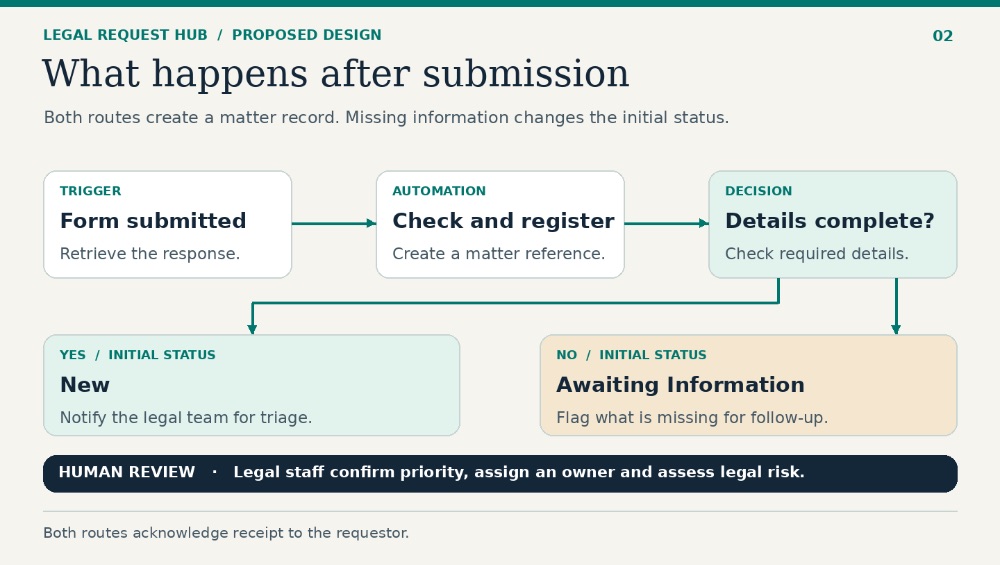
Flow 1: Register a new legal request
Trigger: A new Microsoft Forms response is submitted.
Actions:
- Retrieve the submitted response.
- Validate the required information.
- Create a new SharePoint matter record.
- Generate a unique matter reference.
- Set the initial matter status.
- Identify missing information.
- Notify the requestor that the submission has been received.
The request could initially be assigned the status:
New
If required information is missing, the record could instead move to:
Awaiting Information
This creates an auditable starting point for the request.
Flow 2: Notify the legal team
Once the matter has been registered, the relevant legal team members can receive a notification.
The notification could include:
- Matter reference.
- Requestor.
- Department.
- Matter type.
- Requested deadline.
- Priority indicator.
- Link to the matter record.
The notification should help the team identify new work without requiring someone to monitor the list continuously.
Flow 3: Manage approvals and status changes
Some matters may require an internal approval before progressing.
Power Automate can coordinate an approval request, record the outcome and update the matter status.
However, the approval workflow needs to be designed carefully.
For example, a flow triggered by every modification to a SharePoint record could accidentally initiate the same approval multiple times.
A separate approval-started indicator or equivalent control can help prevent duplicate processing.
The workflow should also account for rejected approvals, expired requests and failed notifications.
Important design principle: automate the process, not the legal judgement
The system can identify missing information, route a request and notify an assigned lawyer.
It should not automatically decide whether a contract is legally acceptable or whether a complex legal issue is low risk.
Those decisions require appropriate human review.
Automation should remove unnecessary administration and improve consistency, not create the appearance that legal judgement has been automated.
 6. Reporting with Power BI
Capturing structured information is only part of the solution.
The legal team also needs to understand what that information says about its workload and performance.
Power BI provides the reporting layer.
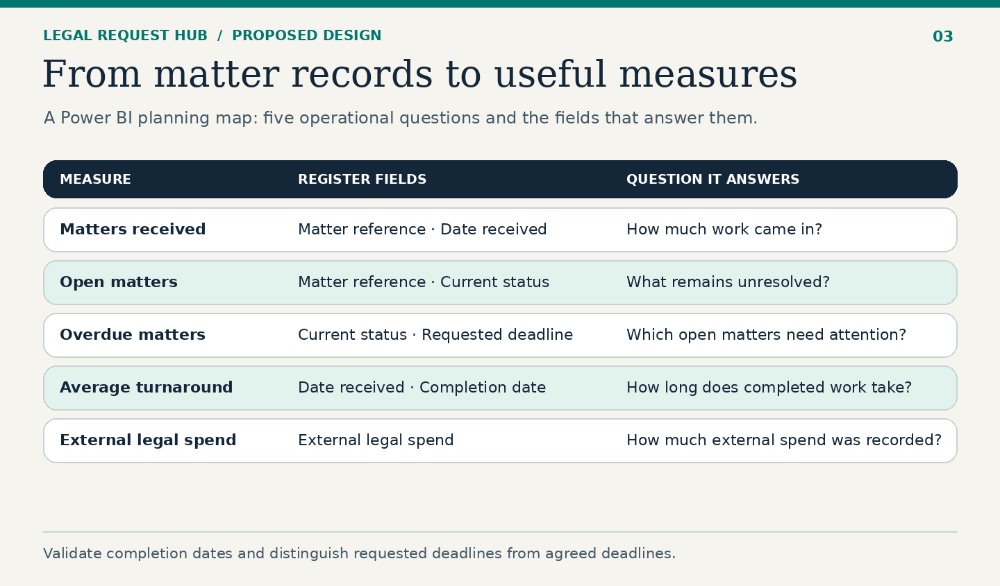
The proposed dashboard would connect to the SharePoint matter register and present a view of legal demand and operational activity.
Proposed dashboard measures
Total matters received
How many legal requests have been submitted?
Open matters
How many requests remain unresolved?
Overdue matters
How many open matters have passed their requested deadline?
Average turnaround time
How long does it take to complete matters?
External legal spend
How much has been recorded as external legal expenditure?
Proposed visualisations
| Visualisation | What it helps explain |
|---|---|
| Matters by department | Where legal demand originates |
| Matters by category | Which legal services receive the most requests |
| Matters by status | Where work is currently sitting |
| Monthly request volume | How demand changes over time |
| Overdue matters | Where deadlines may need attention |
| External legal spend | How much work involves external legal support |
The dashboard should answer operational questions rather than simply display numbers.
For example:
- Is one department generating a disproportionate amount of legal work?
- Are certain categories consistently taking longer to complete?
- Is the number of open matters increasing?
- Are requests frequently delayed because information is missing?
- Is external legal spend concentrated in particular matter types?
These questions can help the legal team identify where process improvements may have the greatest value.
The importance of reliable data
A dashboard is only as useful as the data behind it.
For example, an average turnaround calculation is misleading if completion dates are missing or if the team records the start of a matter inconsistently.
Similarly, a requested deadline should not automatically be treated as an agreed legal deadline.
The data definitions need to be clear.
I would document each measure, its source field and its calculation before presenting the dashboard as a management tool.
 7. Where API integration and custom connectors fit
The Microsoft 365 architecture provides a practical starting point.
However, organisations do not always operate within one technology ecosystem.
An existing legal database, matter management platform or operational system may need to exchange information with other applications.
This is where APIs and custom connectors become relevant.
A custom connector provides a reusable way to expose an external service's API operations inside Power Automate.
Rather than repeatedly configuring generic HTTP requests in individual flows, a connector can expose defined operations through a consistent interface.
For example, a connector might provide actions to:
- Retrieve a matter.
- Create a matter.
- Update a matter.
- Retrieve a list of records.
- Trigger an action when an external event occurs, where supported.
This makes integrations easier to reuse and understand.
A useful example is Juliet Edjere's tutorial on building a Baserow custom connector in Power Automate using OpenAPI.
The tutorial demonstrates the relationship between a data source, a custom connector and the automation flow. It also covers authentication, action definitions, response schemas, testing and webhook-triggered workflows.
The broader lesson is that integration design should be treated as part of the architecture, not as an afterthought.
The correct tool depends on the existing environment and the problem being solved.
The objective should not be to use as many tools as possible. It should be to create a reliable workflow with the fewest unnecessary moving parts.
8. Security, governance and operational controls
A legal operations system handles information that may be confidential, commercially sensitive or personal.
Security cannot be added at the end.
It needs to be considered during the initial design.
For a real implementation, I would examine the following areas.
Access control
Not every employee should have access to every legal matter.
Permissions should reflect the responsibilities of the requestor, legal team members and relevant administrators.
Sensitive employment, litigation or other restricted matters may require additional access controls.
Data minimisation
The intake form should collect information needed to assess and manage a request.
It should not encourage employees to upload unnecessary personal or confidential information.
Auditability
The system should provide an appropriate record of important events, including:
- When a matter was submitted.
- When its status changed.
- Who was assigned.
- When an approval was requested.
- Whether an approval was granted or rejected.
- When the matter was completed.
Error handling
Automation failures should not silently disappear.
The design should include a way to identify failed runs, notify the appropriate owner and support recovery.
Data retention
The organisation should define how long records and supporting documents are retained, how they are archived and when they should be deleted.
Human oversight
The system should make it clear which actions are automated and which decisions require legal review.
These controls are particularly important when considering future AI capabilities.
9. Where AI could add value
AI is an interesting extension, but I would not make it the foundation of the first version.
The initial objective is to establish reliable intake, structured records, workflow ownership and reporting.
Once those foundations exist, AI could support selected activities.
Potential use cases include:
- Summarising supporting documents.
- Extracting key contract information.
- Identifying missing information in a submission.
- Classifying incoming requests for human confirmation.
- Searching approved internal legal guidance.
- Drafting routine communications for review.
Each use case would need to be assessed for accuracy, confidentiality, access permissions and the consequences of an incorrect output.
For example, an AI-generated contract summary could help a lawyer identify relevant clauses more quickly. It should not be treated as a substitute for reviewing the underlying agreement.
The principle is simple:
Establish a reliable process first. Introduce AI where it solves a clearly identified problem.
How to measure whether the solution works
A successful workflow is not simply one that runs without errors.
It should improve the way the team operates.
I would establish a baseline before implementation and compare it with the results after the system has been tested and adopted.
Potential measures include:
| Measure | What it tells us |
|---|---|
| Request completeness | Whether submissions contain the required information |
| Registration time | How quickly new requests enter the matter register |
| Time to allocation | How quickly a request receives an owner |
| Average turnaround | How long matters take to complete |
| Overdue matter rate | How often requested deadlines are missed |
| Duplicate records | Whether the intake process creates unnecessary duplication |
| External legal spend | How much external legal support is being used |
These measures should be interpreted carefully.
A reduction in turnaround time does not automatically mean that legal work has improved. Matter complexity, staffing levels and the quality of the work also matter.
The goal is to create better operational visibility and support evidence-based decisions.
I would begin with a small, controlled workflow and expand only after the first version proves useful.
A legal request management system is not valuable simply because it uses Microsoft Forms, SharePoint, Power Automate or Power BI.
Its value comes from how those components work together.
The form creates a consistent entry point.
The data model creates a reliable record.
The automation coordinates the process.
The dashboard provides visibility.
The governance controls help protect the information and maintain accountability.
Further reading
These resources informed some of the architectural and integration ideas explored in this article:
- Book a strategy session with Juliet Edjere
- Build a custom connector in Power Automate with OpenAPI
- Visualize Power BI data in Baserow
ABOUT ME
Juliet Edjere is an AI Systems & Workflow Strategist. Lawyer by training, systems thinker by trade. Combining a legal background with low-code and data architecture expertise, she helps organisations design scalable data architectures, build secure, automated workflows and AI-native operations.
💡 Need help transitioning from fragmented data to secure, scalable systems?
- Work with Juliet: Book a 1:1 Strategy Session
- Build real-world experience: Explore simulated scenarios at JEA Labs
Website built with Carrd
Other Posts